SimEngine is a lean, open-source C++20 and Vulkan 1.3 game engine with no editor and no GUI baggage. Claude Code, Codex or any coding agent discovers it, changes a scene, runs it headless, looks at the frame and proves the change from one terminal. Tokens go into your game, not into learning a tool.
agent-prompt.txtPaste it into Claude Code, Codex or any agent
Set up SimEngine and build my first verified scene with it.Read https://indiega.me/simengine/llms.txt and https://indiega.me/simengine/agent-guide.md first, then AGENTS.md in the SimEngine checkout. Get the checkout with git clone https://github.com/romainsimon/SimEngine.git (keep it outside my project). The repository is private until the first distributable milestone: if the clone fails with "Repository not found" or asks for credentials, stop and tell me I need access, do not look for copies elsewhere. SimEngine is a local C++20 / Vulkan 1.3 engine driven from the command line: there is no hosted API, no API key and no MCP server. Every tool prints one JSON document per command; classify results by exit code, then by error.code.1. Setup. On Linux run ./tools/setup.sh--install-missing; on Windows 11 (Visual Studio 2022 C++ x64, CMake 3.28+, Ninja, Python 3.12+) run tools/setup.ps1. Expect zero failures among the selected CTest tests and report skips separately. Show me the smoke summary JSON naming my Vulkan device, or the structured BLOCKED outcome.2. Discover. Run simengine_host--capabilities and tell me the scenario schema version, the commands, components and modules this build has. Use nothing that is not listed.3. Create. Follow the simengine-create-project skill (https://indiega.me/simengine/skills/simengine-create-project/SKILL.md): create my project OUTSIDE the engine checkout, check it, run it and verify it. Expect PASS, 3 of 3 expectations, three PNG captures and a manifest.json.4. Change. Follow the simengine-modify-scene skill: add one object, move it with a scheduled command, add an expectation for where it ends, then check, run and verify again. Prove the change: the new final_state_sha256 differs, the new expectation passed and the new capture shows the object.5. On failure, follow simengine-run-capture-diagnose: report the exit code, failure.code, failure.step and failure.message verbatim, fix only my project files, and say plainly if the render is BLOCKED_ENVIRONMENT (no Vulkan device). Never edit engine sources, tests or examples to get a pass, and never fake a capture.SimEngine is pre-release. This workflow covers headless scenarios and captures, not general gameplay authoring. Textured static assets and a separate native SDK are implemented; the reviewed external Relay Yard preview exercises input, a game loop and directional shadows. Do not infer scenario commands from those native features. General rigid-body gameplay and audio remain unavailable here. Finish with a short report: commands run, exit codes, digests, PNG paths, and what SimEngine could not do. For refactors preserve expected state; presentation changes can change pixels without changing the simulation digest.
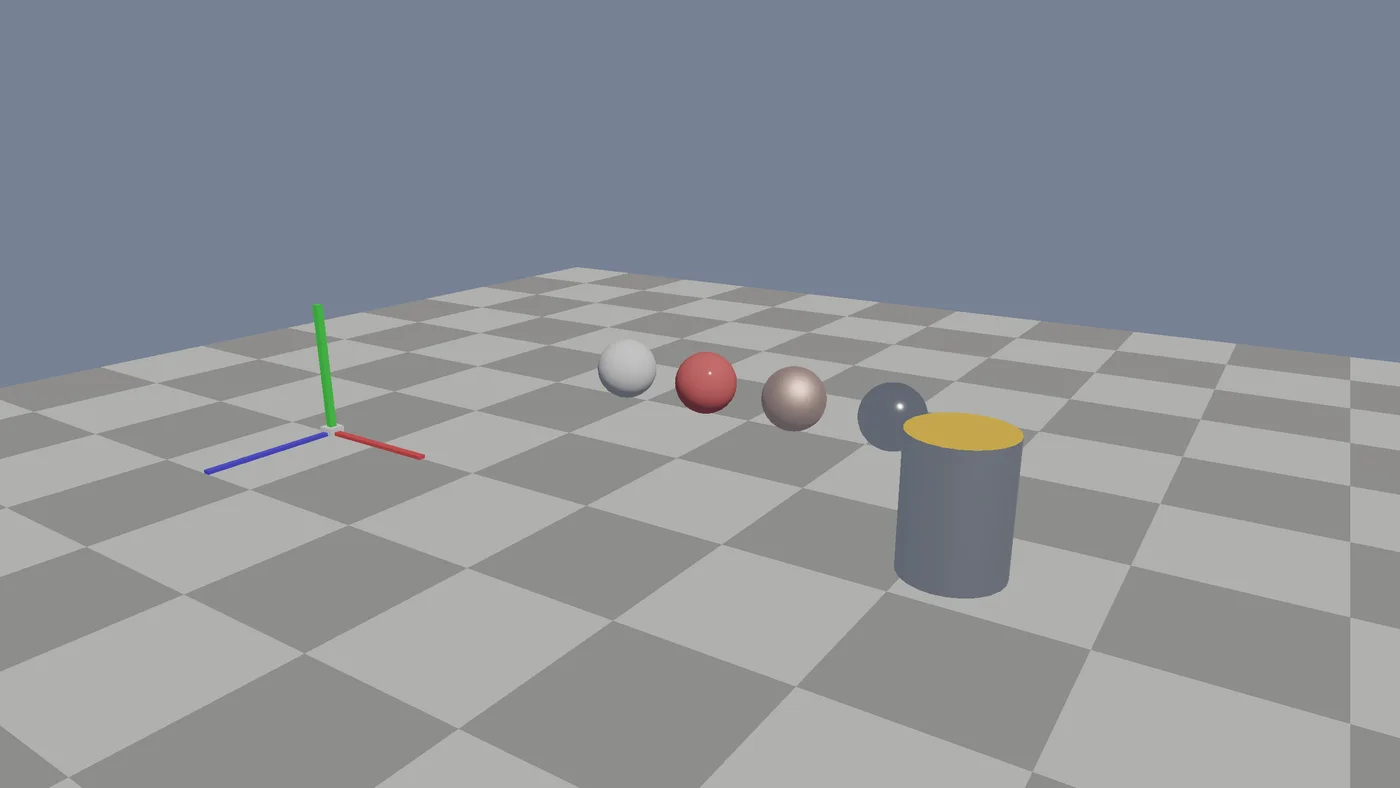
first_scene, replayed in your browser with three.js · the engine itself renders with Vulkan
How agents drive it
Shell + JSON
Every command returns one typed JSON document with coded errors. No plugin, no MCP bridge.
What it runs on
C++20 · Vulkan 1.3
Native code on a thin, direct backend. No VM, no garbage collector, no AI calls at runtime.
What it costs
Free
MIT license. The repository opens with the first distributable milestone.
Where it stands
Pre-release
A C++ game layer with input, cameras, collision, rigid-body physics, sound and saves works today. Skeletal animation is next.
01Definition
What is an AI game engine?
An AI game engine is a game engine built so that AI agents can create, run and verify a game, not just suggest code for it. It exposes a discoverable command interface, reproducible headless runs and machine-readable results, so a coding agent like Claude Code or Codex can check its own work.
Our thesis
What if you rebuilt a game engine from the ground up for AI agents, not for humans?
No editor to drive, nothing to click. A CLI, typed JSON, seeded runs and captures an agent can check. Here is what changes.
AI bolted onto an editor
A chat panel inside a GUI made for mouse and keyboard
The agent infers state from screenshots and opaque files
"Done" usually means "it compiled"
Often tied to one vendor's plan or credits
Engine built for agents
Typed commands with versions, units, frames and coded errors
Seeded headless scenarios and offscreen captures
"Done" means expectations passed and the state digest changed as intended
Works with any agent, and the runtime has no AI dependency
02Built for LLMs
Less engine to learn, fewer tokens per change.
Most engines are built around a human in an editor. SimEngine is built around an LLM in a terminal: we removed what only humans use, kept what lets an agent check its own work, and wrote the runtime in native C++ for speed.
Engine with an editor
learning the toolgame
SimEngine
your game
context window · illustrative
Less to read
Fewer tokens spent learning the engine
No visual editor, no GUI state, no plugin marketplace. Everything an agent needs is one capabilities document, versioned text files and a compact API index. A smaller surface means less context spent figuring out the tool, and more spent on your game.
Coded errors with the failing step, seeded runs, state digests and captures tell the agent at once whether a change is right. Cost per accepted change (time, model cost, retries, human interventions) is an engine metric, measured on a fixed task corpus.
16.7 ms · 60 FPS budget
frame time · proposed 2560×1440 target
Native speed
C++ all the way down, for AAA ambitions
The engine is C++20 on a thin, direct Vulkan 1.3 backend, with no virtual machine and no garbage collector in the runtime. Gameplay is native code plus data. Frame time is a budget: the proposed target is 2560×1440 at 60 FPS, natively rendered, with tails measured.
−Left out, on purpose
Visual editorA minimal diagnostic inspector is planned instead
GUI authoring stateScenes are versioned text with units and frames
Plugin marketplaceOptional modules with explicit contracts
Scripting VMNative code and data until evidence says otherwise
A platform matrixWindows 11 x64 first, Linux for headless CI
An LLM in the runtimeAI drives development, never a frame
Seeded headless scenariosSame seed, same ticks, same digest
Offscreen Vulkan capturesPNG plus manifest, a black frame fails
Structured diagnosticsCoded errors with the step that failed
Native C++20 + Vulkan 1.3No VM, no GC, frame time as a budget
Agent skillsCreate, modify and diagnose, in every project
Cutting the editor doesn't make the runtime faster by itself. It shrinks what an agent has to learn. Speed comes from native code and measured frame budgets.
03Philosophy
Six rules that stop agents from guessing.
SimEngine is opinionated on purpose. Each rule removes a way an agent can be wrong without knowing it.
01
The agent is the user
Host capabilities are discoverable typed commands; native SDK contracts and application diagnostics describe the separate game-development surface.
02
Proof, not vibes
Acceptance checks behavior, intermediate states and visible output. Refactors can preserve the simulation digest; a changed hash alone proves nothing.
03
Same seed, same world
Scenarios pin seeds, ticks and commands. Two runs give one digest, so every bug can be replayed from a file.
04
Eyes when it matters
Headless by default, captured through Vulkan when pixels matter. A missing or black frame counts as a failure.
05
Nothing you didn't ask for
A small core with optional modules. A disabled module isn't compiled, linked or discoverable.
06
AI builds it, AI doesn't run it
The runtime never calls a model. Your game ships with no AI dependency, and any agent can drive development.
Also in the boxIsolated worktrees per agentAgent skills in every projectCoded, structured errorsBuild identity sidecarsDeterministic glTF cookingMeasured iteration loop
04Not to be confused with
An engine you own, not a game generator.
"AI game engine" means four different things. Here is where SimEngine sits.
AI game generators
Describe a game, get a playable browser build. Great for quick prototypes, but the model makes the implementation decisions and you inherit whatever architecture it picked.
Neural game engines
Research systems like GameNGen generate every frame with a neural network. Fascinating, but there is no scene, code or toolchain to build a game on.
Editors with an AI assistant
Established engines combine visual tools with command-line automation and optional agent integrations. The useful comparison is accepted development work under equivalent conditions.
SimEngine
A native C++20 and Vulkan engine whose primary interface is the agent's: CLI, typed JSON, seeded runs and captures. You direct the game; the agent builds it and proves each change.
This is how a coding agent builds with SimEngine today, and the loop the engine is optimized for. Every step is a command the agent runs and a JSON document it parses. The edit-build-run-verify cycle is tracked like a frame-time budget.
01 / 05
Discover
The agent asks the engine what it can do. It gets back one typed JSON document listing schema versions, commands, components and modules, so it doesn't have to guess from the docs.
Today the loop moves objects. It is built to drive a whole game.
Rendering, physics, input, gameplay, animation, audio, saves, shipping: every area a game needs, driven the same way, by commands an agent can check. Here is where each one stands. The interface is documented before it is built.
SimEngine's setup is written for your agent. It runs the same rerunnable scripts that humans and CI use, and it reports failures verbatim instead of working around them.
Set up SimEngine and verify my environment end to end.1. Clone https://github.com/romainsimon/SimEngine and read AGENTS.md first. If the clone fails (private until the first release), stop and tell me.2. Run tools/setup.ps1 (Windows 11) or ./tools/setup.sh--install-missing (Linux).3. Expect zero failures among the selected CTest tests; report skips separately.4. Show me the smoke summary JSON naming my Vulkan device.5. Report anything that failed verbatim, with its exit code. Do not work around a failure silently.
PromptcopiedPaste it into your agent.
07Comparison
Unity vs Unreal vs Godot vs SimEngine.
Unity, Unreal and Godot are excellent, production-proven engines built around a visual editor, with AI added through assistants and MCP bridges. SimEngine trades the editor for an interface agents drive directly. Here is the short version, five criteria; the full comparison covers fourteen, with agent-ready scores and head-to-head verdicts.
SimEngine vs
Comparison of Unity, Unreal Engine, Godot and SimEngine for AI-assisted game development
As of Nov 2026
Unity
Unreal Engine
Godot
SimEngine
Primary interface Where the work happens, and what an agent must learn
~Partial: Unity AI assistant + MCP bridge (beta, paid plan)
~Partial: Experimental MCP plugin in the editor (5.8)
–Limited: None first-party; community MCP plugins
✓Strong: The engine interface itself is designed for agents, with any provider
Scene format How easily an agent can read and diff it
~Partial: YAML with GUID references
–Limited: Binary .uasset
✓Strong: Text .tscn
✓Strong: Versioned schemas, explicit units and frames
License & cost
~Partial: Proprietary · Personal free under $200K revenue
~Partial: Source-available · 5% royalty past $1M
✓Strong: MIT · free
✓Strong: MIT · free (source opening soon)
Maturity
✓Strong: Production, since 2005
✓Strong: Production, since 1998
✓Strong: Production, 4.x
–Limited: Private pre-release; reviewed small native game preview
✓Strong for agents~Partial–Limited
Based on public documentation as of October 2026. Unity, Unreal and Godot are production engines that ship thousands of games. SimEngine is pre-release, and the table says so. The question here is narrower: how well can a coding agent drive each engine on its own?
Unity for the widest platform reach, Unreal for high-end 3D, Godot for a light, open, text-friendly engine. Pick SimEngine if you want your agent to prove its changes, and you can wait for it to mature.
08Status, honestly
What works today, and what doesn't yet.
SCN-001 · offscreen Vulkan · RTX 4070 TiEngine output, not concept art
✓Works today
One-header C++ game layer: game loop, entities, input, cameras, HUD, glTF levels
Walking character with collision generated from the level meshes
Rigid bodies on Jolt in the game API: shapes from meshes, joints with motors, triggers, collision events, multithreaded solver
Sound in the game API: WAV, MP3, FLAC or generated samples, 3D voices that follow entities, an offline mix headless runs can save and check
Game saves: values and entity snapshots, atomic writes, damaged files rejected
Every game runs headless with captures, input replays and a JSON report
Seeded, headless scenarios with typed commands and expectations
Offscreen Vulkan PBR capture to PNG with a manifest
Windows scene playground: camera, selection, move, export
Offline glTF/GLB cooking with textured PBR and mip chains
An AI game engine is a game engine built so that AI agents can create, run and verify a game, not just suggest code. In SimEngine, that means typed commands, seeded headless runs, machine-readable results and offscreen captures that Claude Code, Codex or another coding agent can use without a human clicking through an editor.
It depends on what you need today. To ship a game now, Godot, Unity or Unreal with an AI assistant or MCP plugin is the safe choice. If you want an engine whose interface is designed for coding agents, with reproducible runs and checkable results, SimEngine is built for that, but it is pre-release and can't ship a game yet.
An AI game generator turns a prompt into a playable game and makes most implementation decisions for you. An AI game engine gives an agent the infrastructure to build a game you direct and own: code, scenes, runs and tests. SimEngine is an engine, not a generator. There is no prompt-to-game shortcut.
AI can write much of a game's code, and generators can produce small browser games from a prompt. A complete, polished game still needs a human directing design, art and review. SimEngine's bet is narrower: give the coding agent an engine where it can prove each change worked, so you review evidence instead of guessing.
Yes. Any agent that can run a shell command and read JSON works: Claude Code, OpenAI Codex, Cursor, GitHub Copilot, Gemini CLI and others. No MCP bridge is needed. New projects include agent skills (SKILL.md files) for creating, modifying and diagnosing a scene, which the agent loads to learn the workflow.
Because its primary user is an LLM, not a person with a mouse. An editor adds GUI state an agent cannot see and a large surface it would have to learn. SimEngine exposes everything as typed commands, versioned text and captures instead. A minimal diagnostic inspector is planned for humans who need to look inside.
That is a design goal, and it is measured rather than promised. A smaller surface (one capabilities document, a compact API index, no GUI) means less context spent learning the engine, and checkable results mean fewer retries. SimEngine tracks cost per accepted change, including model cost, on a fixed task corpus against a baseline. A first pilot with the game layer used 21% more tokens than Godot for an equivalent crate puzzle; the five-brief comparison will decide.
AAA visuals are the ambition, not a claim yet. The runtime is native C++20 on a direct Vulkan 1.3 backend, with no VM or garbage collector, and frame time is treated as a budget: the proposed target is 2560×1440 at 60 FPS natively rendered on reference hardware. Today the renderer has HDR, image-based lighting, clustered local lights, TAA and cascaded shadows. In a blind review it rated 2.3 out of 5 against Unreal’s 5.0, mostly for lack of global illumination.
No. AI drives development, not the runtime. The engine, examples and tests never need an API key or provider SDK, and no frame ever waits for a model. Your shipped game has no AI dependency.
No. SimEngine is a general-purpose 3D engine. Its first example is an ordinary yard with a table, crates and barrels, built with every space module turned off. Orbits, planets and atmosphere are optional modules a non-space game never loads. SpaceSim, our space game, is where the engine comes from and its hardest test, not its scope.
A small native game exists: Relay Yard, an external three-level crate puzzle with input, orbit camera, directional shadows, restart, saves and a Windows package. The engine SDK changes merged in PR #8, and the external game preview passed independent review. The repositories remain private. Main also has a one-header game layer, HDR lighting, clustered lights, TAA and cascaded shadows. Rigid-body physics on Jolt, sound and game saves are in the game layer too. This is not a supported production engine: animation and distribution remain open.
SimEngine puts discoverable contracts, structured failures and reproducible observations at the center of development. Existing engines also support automation; Godot can run, export and capture from its CLI. Our preliminary comparison does not yet establish a productivity advantage. Repeated tasks with matching acceptance criteria, models and budgets will test that claim.
It will be. The code is under the MIT license, and the repository opens publicly with the first distributable milestone. There is no paid AI plan and no AI dependency in the runtime: you use whichever coding agent you already have.
Windows 11 x64 with a Vulkan 1.3 GPU is the first supported target. Linux builds run the headless toolchain and CI. Other platforms come later and only with an accepted decision.
SimEngine started from SpaceSim, a space game first built in Godot. Reaching scales between Kerbal Space Program and SpaceEngine, with AAA visuals and agent-driven development, meant owning the frames, renderer and tooling contracts end to end. The full story is in "Why we built SimEngine" on our blog.